Wednesday, September 2, 2015

INTERFACING LCD WITH ARDUINO, ARDUINO BASIC

This is the basic idea of interfacing lcd with arduino. Idea is taken from the arduino official site.
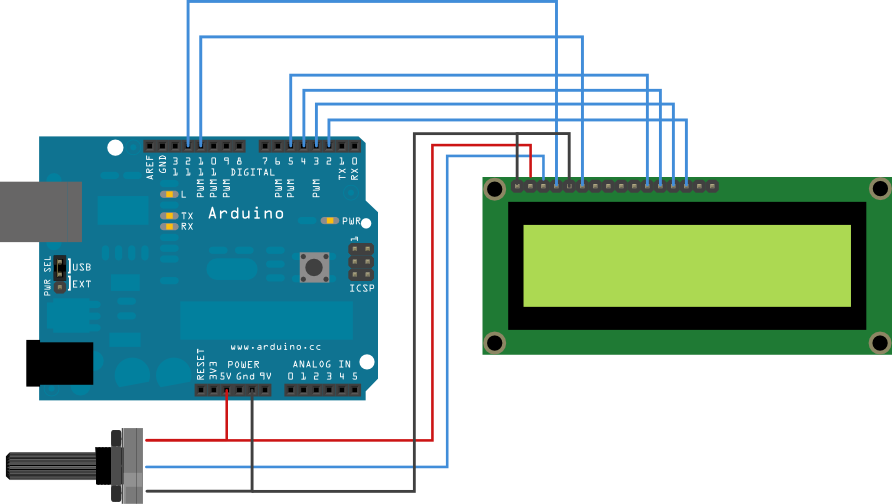
Introduction 

The LiquidCrystal library allows you to control LCD displays that are compatible with the Hitachi HD44780 driver. There are many of them out there, and you can usually tell them by the 16-pin interface.
WANT TO LEARN MORE ABOUT ARDUINO AND ARDUINO BASED PROJECT, CLICK HERE..

This example sketch prints "Hello World!" to the LCD and shows the time in seconds since the Arduino was reset.

Thursday, August 27, 2015

Arduino Based Voting System

Normal type of voting system is ancient and time consuming. The probability of getting error is also greater in that system. So use of embedded system makes the work technical, easy and yet reliable.  The complexity and robustness of a voting system depends on the number of voters involved. Here you could see a simple Arduino based voting system that would be a great fit for small-scale elections such as in schools or colleges. This system was designed to ensure security and the coolest thing is the whole voting process can be done with assembled hardware and Arduino IDE.
This voting system takes vote inputs from pins A2 to A5 of Arduino. A LCD used to show candidates name which was connected in 4 bit mode to the Arduino.

Sunday, July 19, 2015

Artificial Intelligence, A small article


ARTIFICIAL INTELLIGENCE

INTRODUCTION
Intelligence is a great boon of creature by which they feels the real world situation and respond accordingly. This property makes the entire living organism smart to the environment and also it makes them suitable for living in this environment. Small creatures like protozoans and advanced creatures like human and animals have very complicated type of intelligence. The level of intelligence also determines the level of power of creatures. Also the existence of intelligence separates the living and nonliving things. I.e. if the thing has intelligence or life in them, then it is living thing otherwise it is a nonliving thing. By using their intelligence, human has ruled the world from several thousand years ago.

Friday, July 17, 2015

Arduino Introduction and tools for technical education system

What is Arduino? 
 Arduino is a tool for making computers that can sense and control more of the physical world than your desktop computer. It's an open-source physical computing platform based on a simple microcontroller board, and a development environment for writing software for the board. Arduino can be used to develop interactive objects, taking inputs from a variety of switches or sensors, and controlling a variety of lights, motors, and other physical outputs. Arduino projects can be stand-alone, or they can be communicate with software running on your computer (e.g. Flash, Processing, MaxMSP.) The boards can be assembled by hand or purchased preassembled; the open-source IDE can be downloaded for free. The Arduino programming language is an implementation of Wiring, a similar physical computing platform, which is based on the Processing multimedia programming environment.

WANT TO LEARN MORE ABOUT ARDUINO AND ARDUINO BASED PROJECT, CLICK HERE..

 Why Arduino? 
 There are many other microcontrollers and microcontroller platforms available for physical computing. Parallax Basic Stamp, Netmedia's BX-24, Phidgets, MIT's Handyboard, and many others offer similar functionality. All of these tools take the messy details of microcontroller programming and wrap it up in an easy-to-use package. Arduino also simplifies the process of working with microcontrollers, but it offers some advantage for teachers, students, and interested amateurs over other systems:

Temperature sensor circuit using Arduino

Introduction
Temperature sensor circuit can give us information about the temperature of any place(where we place the circuits) and we can control any thing which are function of temperature like Fan etc. The circuit gives us the information when the temperature of any place exceeds the set temperature.
Components Required
1. Arduino(i used Uno)
2. Temperature sensor(Thermistor)
3. Resistor about 2.2k
4. led or Motor
5. BC547 transistor

Tuesday, July 14, 2015

Automatic temperature controlled fan

Here is a circuit to control a fan according to the  temperature of environment. If the  temperature is high, then the fan will automatically turn on and if the temperature is low then the fan will automatically turn off.
The circuit uses following components
1. 9/12 volt power supply
2. LM741 op-amp
3. BC 547 transistor
4. 6.8 k resistor , 10 k resisotor
5. diode
6. fan or motor